
Sankra Casino App and Mobile Play
Your casino on Android and iPhone.
Play directly in your mobile browser. There's no need to download an app or an APK file. Use your email address and password to access your existing account while you're on the move.
18+. An internet connection is required to play.
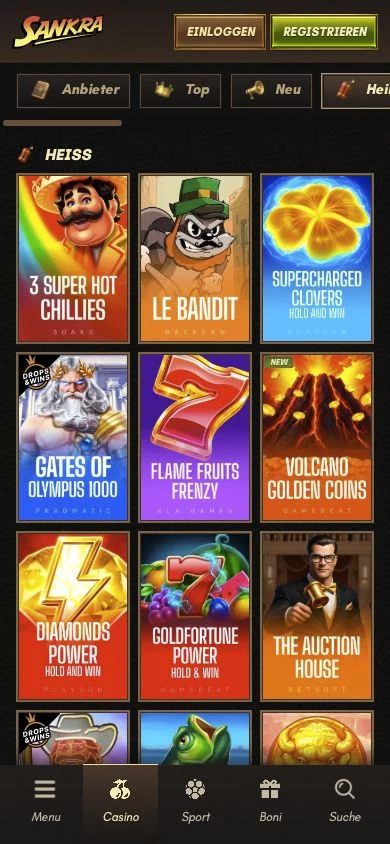
Open the casino in your browser and play with your account
Access our mobile casino through your smartphone browser. You use the same player account on your phone as on your computer. There's no need to register again.
Open casino
Open our casino in your mobile browser.
Log in to your account
Select «Log in» and enter your registered email address and password.
Choose a game
Select a category or use the magnifying glass to search for a game by name.
Sankra Casino on iPhone and iPad
Open our casino in Safari on an iPhone running iOS or on an iPad. You don't need to install anything from the App Store.
You can save a website icon on your iPhone for your next visit. Open the casino in Safari, tap «Share» and select «Add to Home Screen». Depending on your Safari layout, «Share» may be in the page menu. Tap «Add» to save the icon to your device.

Sankra Casino on Android
On Android, you can open our casino in a browser such as Chrome. You don't need to install an APK or allow installations from unknown sources to play in your browser.
To bookmark our casino in Chrome, open the site, tap the three-dot menu next to the address bar and then tap the bookmark icon. On your next visit, open it via «Bookmarks» in the Chrome menu.
App download, APK and mobile browser
No download is required to access our casino on mobile. Open the casino in your browser, log in and choose a game. An APK is an Android installation file; you don't need one to access the casino through your browser.
Similar-sounding names such as SHANKRA or Sank Money refer to other services. They aren't part of Sankra Casino and won't give you access to your player account.



Slots and live casino on your phone
Play slots, live roulette, blackjack and game shows with us. Switch between slots and live casino using the categories, or search directly for a particular game by name.
In the live casino, you play with real dealers via video stream. The video may stutter if your connection is unstable. Streaming also uses mobile data when you're on a mobile network. Slots need an internet connection too; a website icon or bookmark does not save games for offline play.
Mobile login with your existing account
On your phone, log in with the email address you registered with and your password. If you've forgotten your password, you can reset it via «Forgot password». The reset email will be sent to your registered email address.
You don't need a second account for Android or iPhone. If you're using someone else's device or a shared device, log out after playing and don't save your password on it.


Activate your bonus on mobile too
Our welcome package offers up to CHF 10 000 in bonuses and 500 free spins across your first four deposits. Each stage requires a minimum deposit of CHF 20. Activate the relevant bonus under «My bonus» before playing with your deposit. No bonus code is needed.
For the welcome package, you must wager the deposit and bonus combined 30 times. You have ten days from bonus activation to do so. Free spins are awarded in daily batches. Switching devices does not restart the bonus time limit.
If a game or the login page won't load
A game won't load or the live video keeps buffering
The connection is often the cause. Switching between Wi-Fi and mobile data may help.
The page doesn't display correctly
Update your browser and reopen the casino. If the problem persists, try another up-to-date browser.
Your login is rejected
Check your registered email address, password capitalisation and any accidental spaces. You can reset a forgotten password via «Forgot password».
Our support team is available around the clock via live chat and email. To investigate an issue, it helps if you provide the game name, your device, browser and exact error message. You don't need to share your password with us.
Sankra Casino app FAQs
How do I download the Sankra Casino app?
You don't need an app download for our mobile casino. Play directly in your browser on Android or iPhone and log in with your existing account.
Do I need a Sankra Casino APK for Android?
No. Mobile browser access works without installing an APK. You can open the casino in Chrome and save it as a bookmark.
Can I use Sankra Casino on iPhone without the App Store?
Yes. Open our casino in Safari and log in there. On iPhone, you can save a website icon using «Share» and «Add to Home Screen».
Do I need to create a new account for my phone?
No. On your smartphone, use the email address and password for your existing account. You don't need a second account for a different device.
Can I play without an internet connection?
No. Both slots and live games require an internet connection. A bookmark or website icon won't make the games available offline.
Do my bonus terms change when I play on mobile?
Switching to your phone doesn't start a new bonus or reset the time limit. The relevant deposit stage, wagering requirements and time limit from bonus activation still apply to your welcome package.

Open Sankra Casino on your phone
Log in to your account and choose a slot or live table. Our mobile casino opens directly in your browser.